> ## Documentation Index
> Fetch the complete documentation index at: https://apidocs.sessionboard.com/llms.txt
> Use this file to discover all available pages before exploring further.
# Build an Integration
> Methods for syncing Sessionboard data to your platform
Sessionboard offers several methods for getting your event data into external platforms. Choose the approach that best fits your technical requirements and use case.
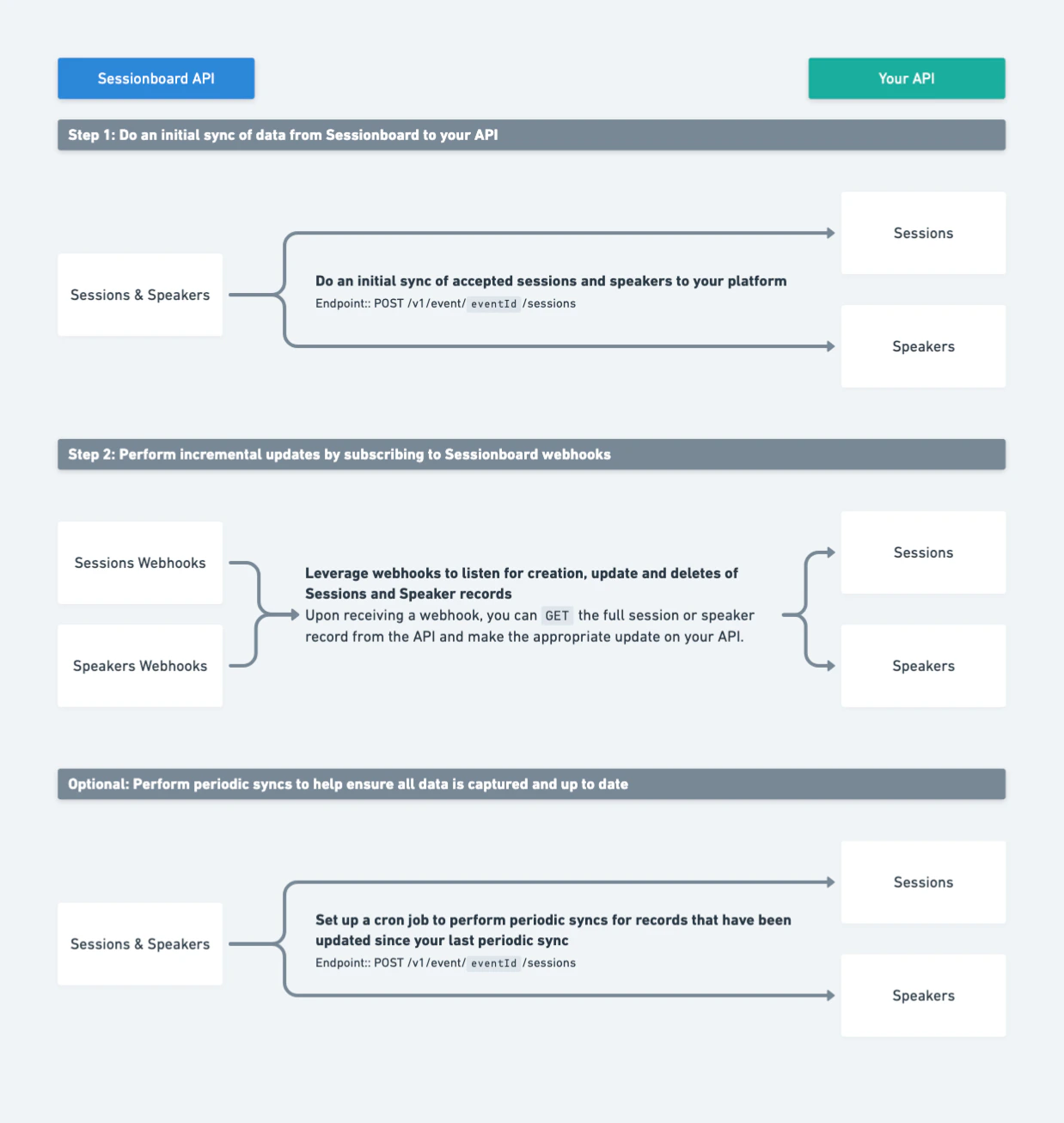 **Best for:** Real-time sync with full metadata access.
Use the Public API to query sessions, speakers, contacts, sponsors, and exhibitors on demand. Combine with webhooks to receive push notifications when data changes, eliminating the need to poll for updates.
**Best for:** Real-time sync with full metadata access.
Use the Public API to query sessions, speakers, contacts, sponsors, and exhibitors on demand. Combine with webhooks to receive push notifications when data changes, eliminating the need to poll for updates.
[Authentication →](/authentication) | [Webhooks →](/webhooks) | [API Reference →](/api-reference/overview)
**Best for:** One-off integrations and website embeds.
Sessionboard provides JSON, XML, and HTML feed URLs for your event data. Embed feeds are refreshed every 60 minutes and require no authentication. Use them to display session listings, speaker directories, or schedules on your website.
Configure embed feeds from **Event Settings > Integrations > Embeds** in the Sessionboard admin dashboard.
**Best for:** Connecting to thousands of apps without code.
The Sessionboard Zapier integration (currently in beta) lets you trigger workflows in tools like Slack, Google Sheets, HubSpot, and more when data changes in Sessionboard.
Contact [support@sessionboard.com](mailto:support@sessionboard.com) to enable Zapier for your organization.
**Best for:** One-time data snapshots and reporting.
Export XLSX or CSV files directly from any list view in the Sessionboard admin dashboard. Exports include all visible columns and can be filtered before downloading.
Use the export button in the top-right corner of any list view (sessions, speakers, contacts, etc.).
## Choosing the Right Method
| Requirement | Recommended Method |
| ---------------------------------- | ------------------ |
| Real-time data sync | API + Webhooks |
| Display data on a website | Embeds |
| Connect to third-party SaaS tools | Zapier |
| Ad-hoc reporting or auditing | Data Exports |
| Custom mobile app or internal tool | API + Webhooks |
| Low-code / no-code workflow | Zapier or Embeds |