> ## Documentation Index
> Fetch the complete documentation index at: https://apidocs.sessionboard.com/llms.txt
> Use this file to discover all available pages before exploring further.
# Webhooks
> Receive real-time notifications when data changes
Webhooks allow your application to receive real-time HTTP callbacks when data changes in Sessionboard. Instead of polling the API for updates, you can subscribe to specific events and receive notifications as they happen.
## Event Catalog
Subscribe to any combination of the following webhook events.
| Event | Description |
| ----------------------------- | ---------------------------------------------- |
| `contact.created` | A new contact was created in the organization. |
| `contact.updated` | A contact's details were updated. |
| `contact.deleted` | A contact was deleted from the organization. |
| `contact.event.associated` | A contact was associated with an event. |
| `contact.event.disassociated` | A contact was removed from an event. |
\| Event | Description | | --- | --- | | `session.created` | A new session was
created. | | `session.updated` | A session's details were updated. | |
`session.deleted` | A session was deleted. | | `session.speaker.attached` | A
speaker was attached to a session. | | `session.speaker.detached` | A speaker
was detached from a session. |
\| Event | Description | | --- | --- | | `exhibitor.created` | A new exhibitor
was created. | | `exhibitor.updated` | An exhibitor's details were updated. |
\| `exhibitor.deleted` | An exhibitor was deleted. | |
`exhibitor.event.associated` | An exhibitor was associated with an event. | |
`exhibitor.event.disassociated` | An exhibitor was removed from an event. |
| Event | Description |
| ----------------------------- | --------------------------------------- |
| `sponsor.created` | A new sponsor was created. |
| `sponsor.updated` | A sponsor's details were updated. |
| `sponsor.deleted` | A sponsor was deleted. |
| `sponsor.event.associated` | A sponsor was associated with an event. |
| `sponsor.event.disassociated` | A sponsor was removed from an event. |
## Payload Structure
Every webhook delivery sends a JSON payload with two top-level keys: `data` (the full resource that changed) and `metadata` (information about the event itself).
The `data` field contains the **full resource object** for the affected entity
(Session, Contact, Sponsor, or Exhibitor). Its shape matches the corresponding
response schema in the [API Reference](/api-reference/overview).
Example delivery for a `session.updated` event:
```json theme={null}
{
"data": {
"id": "fd4e0275-f018-40bc-909a-f8cdfa0df354",
"sourceOfChange": "user"
},
"metadata": {
"action": "session.updated",
"actor_id": 7,
"event_id": 4001,
"org_id": "757e8d5b-ce66-45f5-ab36-273414f8ab2f",
"resource_url": "https://public-api.sessionboard.com/v1/event/4001/sessions/fd4e0275-f018-40bc-909a-f8cdfa0df354",
"version": 1,
"datetime": "2026-04-28T16:00:00Z"
}
}
```
The `data` object above is abbreviated — production payloads include every field of the resource. Refer to the `Session`, `Contact`, `Sponsor`, and `Exhibitor` response schemas in the [API Reference](/api-reference/overview) for the complete shape.
### Payload Attributes
| Field | Description |
| ----------------------- | ------------------------------------------------------------------------------------------------- |
| `data.sourceOfChange` | Changes were performed by a user or an agent. |
| `data.id` | Unique identifier of the affected resource. Always present at the top of `data`. |
| `metadata.action` | The webhook event type (e.g., `session.updated`). |
| `metadata.actor_id` | ID of the user who performed the action. `null` for system-generated events. |
| `metadata.event_id` | The Sessionboard event ID associated with the change. `null` for organization-level events. |
| `metadata.org_id` | Your organization's unique identifier. |
| `metadata.resource_url` | Direct URL to fetch the full resource from the Public API. |
| `metadata.version` | Payload schema version. Currently `1`. New non-breaking fields may be added without bumping this. |
| `metadata.datetime` | UTC ISO 8601 timestamp of when the event occurred in Sessionboard. |
**Forward compatibility:** Sessionboard may add new fields to `data` and
`metadata` at any time. Webhook consumers should ignore unknown fields rather
than fail on them. Removed or renamed fields will trigger a `metadata.version`
bump.
## Creating a Webhook
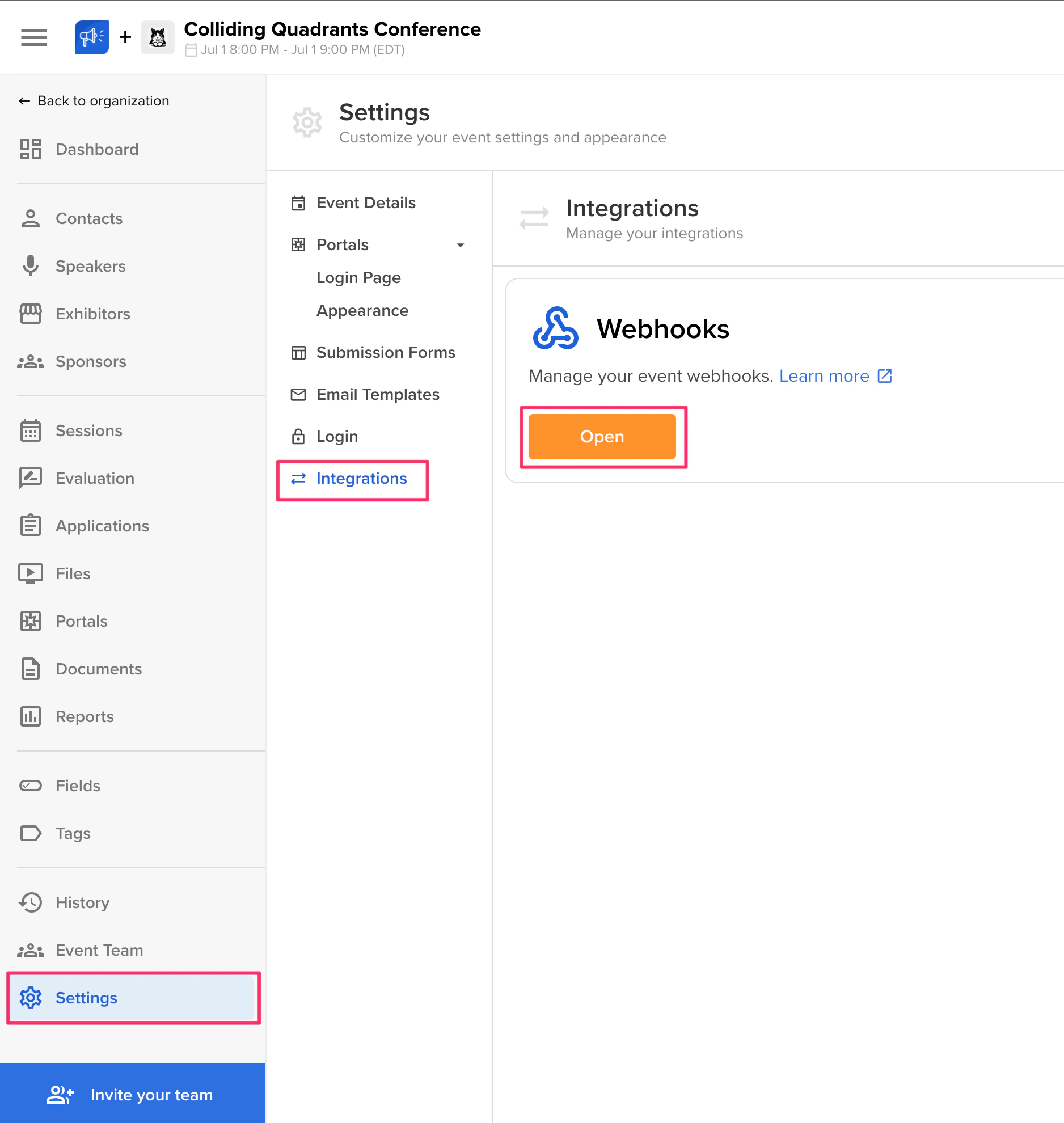
In the Sessionboard admin dashboard, navigate to **Settings > Integrations > Webhooks**.
 Click **Add Endpoint** and enter the URL where you want to receive webhook deliveries. This must be a publicly accessible HTTPS endpoint. Select which events you want to subscribe to for this endpoint.
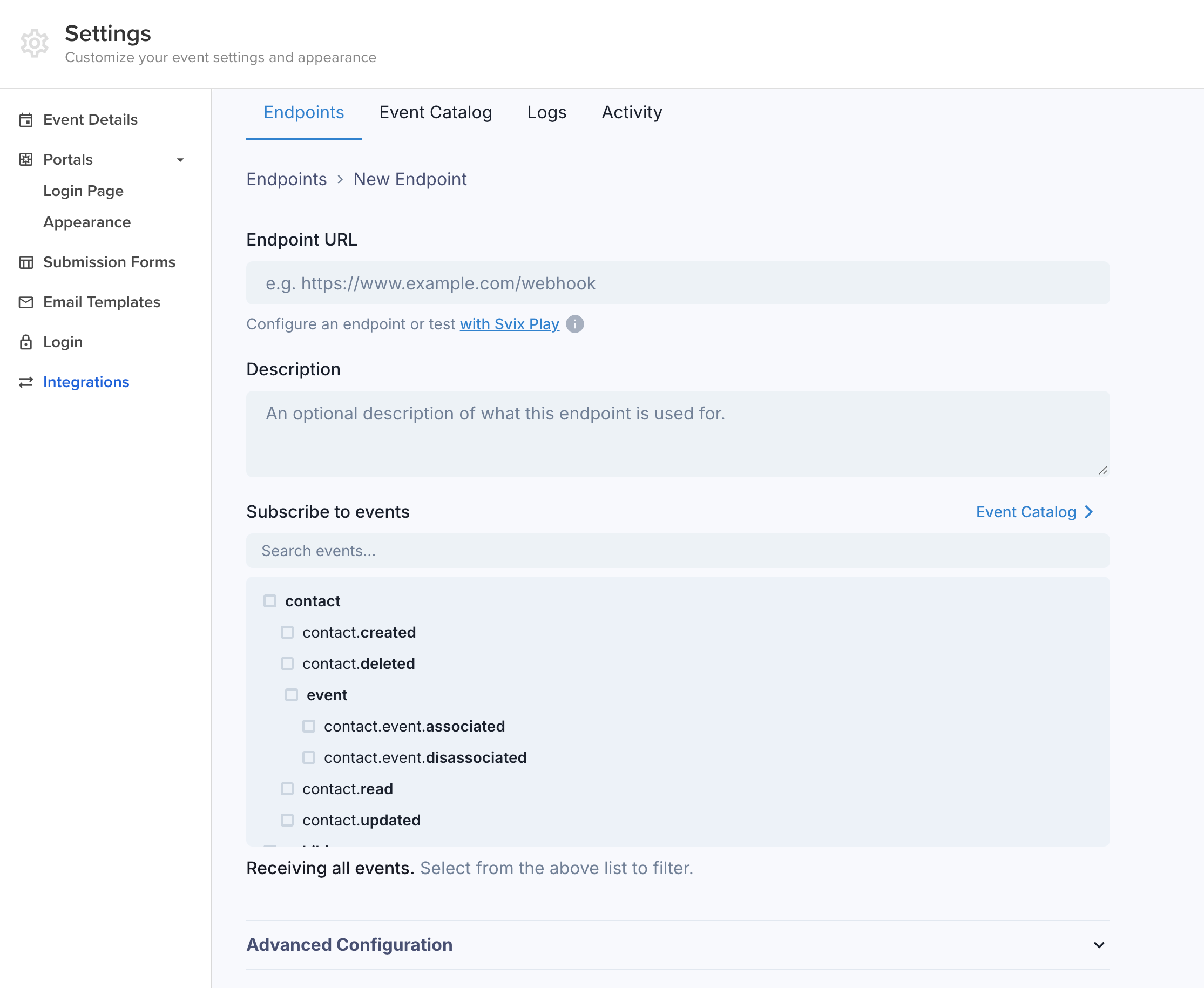 Save the webhook configuration. Sessionboard will begin sending events to your endpoint immediately. You can also add custom headers for additional security (e.g., passing a token that your server validates to ensure the request is from Sessionboard).
## Testing Webhooks
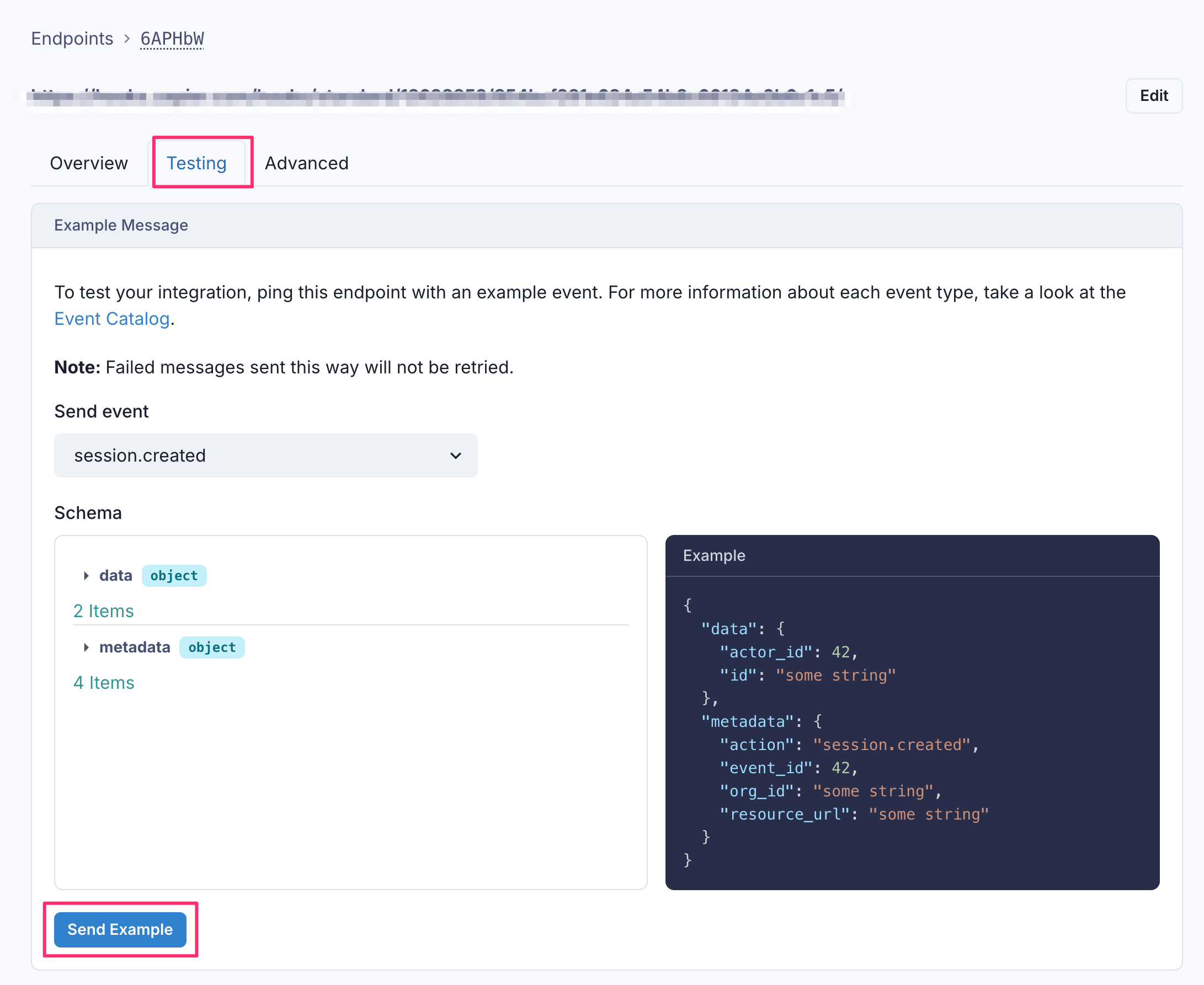
Use the **Testing** tab on any endpoint to send a sample payload without triggering a real action. You can also use [Svix Play](https://play.svix.com) to capture and inspect deliveries in a temporary sandbox.
Save the webhook configuration. Sessionboard will begin sending events to your endpoint immediately. You can also add custom headers for additional security (e.g., passing a token that your server validates to ensure the request is from Sessionboard).
## Testing Webhooks
Use the **Testing** tab on any endpoint to send a sample payload without triggering a real action. You can also use [Svix Play](https://play.svix.com) to capture and inspect deliveries in a temporary sandbox.
 ## Monitoring
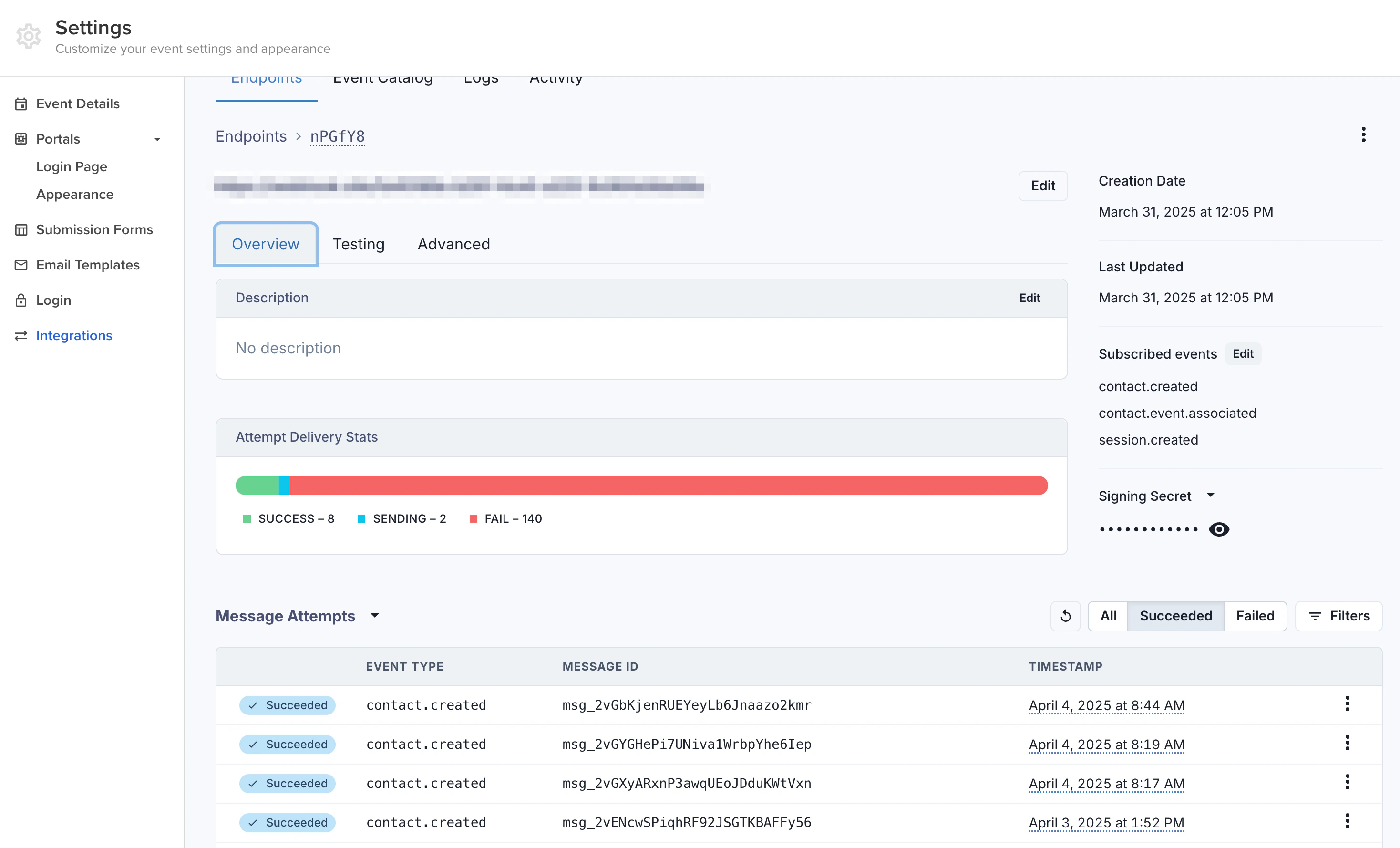
Sessionboard provides delivery logs for each webhook endpoint in the admin dashboard. You can view recent deliveries, inspect payloads, and check response status codes. Failed deliveries are retried automatically with exponential backoff.
## Monitoring
Sessionboard provides delivery logs for each webhook endpoint in the admin dashboard. You can view recent deliveries, inspect payloads, and check response status codes. Failed deliveries are retried automatically with exponential backoff.